Hey Wander, really enjoying Notes, the voice transcription and scanning work great.
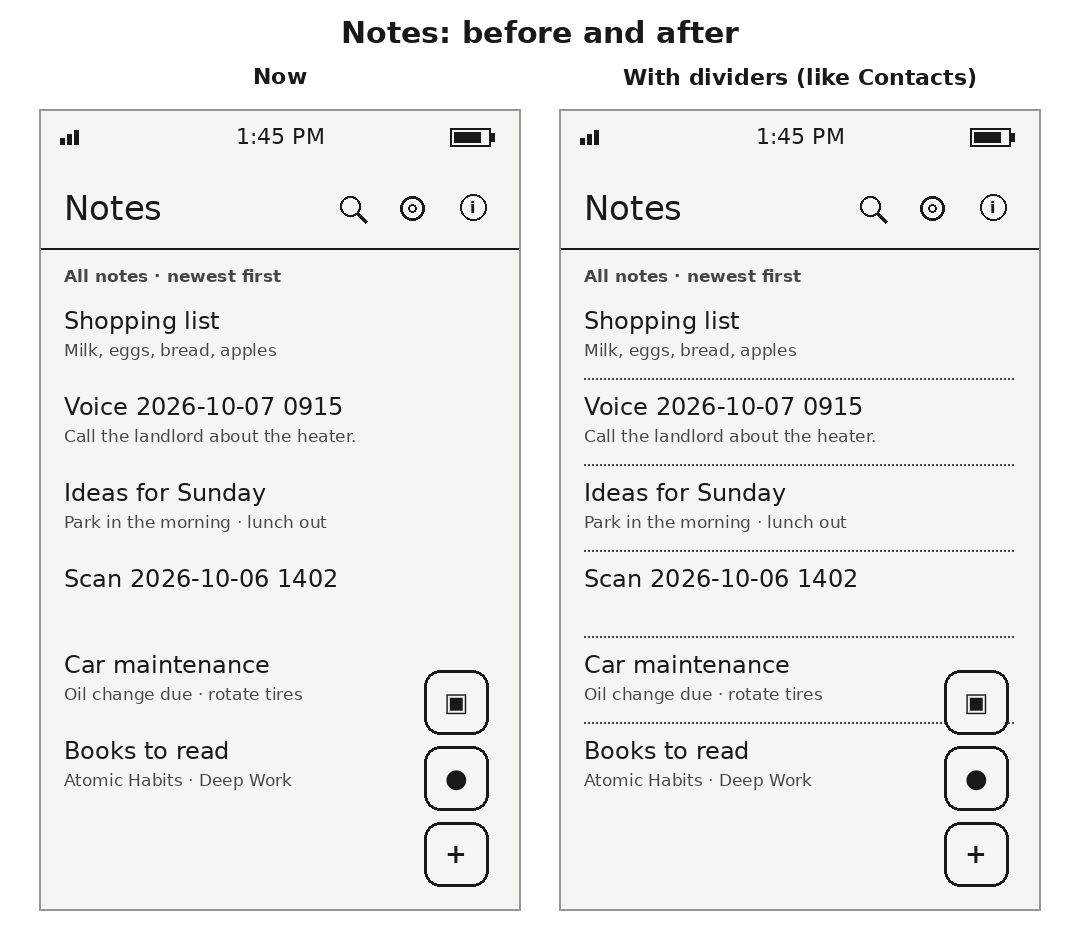
One thing that would make the list a lot easier to read is thin dotted divider lines between notes, like you have in your Contacts app and like Mudita’s stock Notes app. Right now the titles and previews run together, and on e-ink it’s hard to tell where one note ends and the next begins.
I attached a quick mockup to show what I mean, current look on the left and with dividers on the right.
Review for version 0.1.8
Author’s rating: ★★★★★ · Author of this review
@Michaell thanks, good call on e-ink. 0.1.8 has them: the same thin dotted line Contacts uses, between notes and folders, and none under the last one.
0.1.7 before it brought reminders, if they’re useful to you: Remind me… from a note’s ⋮, or hold a list item. The time is kept in the note itself, and it rings only on the phone that set it.
An amazingly functional yet still “digitally minimal” note-taking app! Thank you!
Nextcloud integrations work like a charm, and the Desktop Sync feature is amazing!
I only recently installed the app and wanted to ask if it would be possible to add an option to make the Note app font smaller and to include landscape orientation mode (similar to what the Calendar app offers)?
I also tried using the Note app on the Supernote Manta, and while the app installs without difficulty, connecting to Nextcloud doesn’t seem to work, showing an error message at the login stage saying I don’t have a browser installed, even though I do have EinkBro and Iron Fox installed. Do you have any advice on how to resolve this?
Review for version 0.2.2
Author’s rating: ★★★★★ · Author of this review
@zyny thank you for the kind words, and for asking.
Both are in Notes 0.3.4: Settings now has a text size (small, medium or large), and there is a switch to turn sideways with the phone, so the wide screen is used when you lay it on its side.
The Manta sign-in was a real bug, and your note found it. When a phone has several browsers and none is set as the default, Android asks which one to use, and Notes read that question as “no browser”. With EinkBro and Iron Fox installed and no default chosen, that is exactly what happened. Notes 0.3.5 fixes it: tap Sign in and Android lists your browsers; pick one and the page opens. If you would rather not be asked every time, choose a default browser in the Manta’s settings.
If the sign-in still fails after updating, tell me what it says and I will look again.
Thanks, Wander. I updated to the latest version of the Notes app, and it looks great on both Kompakt and Mudita. The option to have smaller text really makes a difference, especially with longer notes!
Forgive me if I’m overly enthusiastic and making too many suggestions. Your work inspires me, and I’m astounded by how your apps make Kompakt so much more functional and practical while still adhering to the digital minimalism Mudita is known for.
I’m not sure if you’ve used the Notesnook note app, where headers are “collapsible/expandable” so the body text collapses and expands when you click a header. I don’t have a good example to show here, but you can see that if you use the app. I mention it because, at least for now, I’m using the Notes app to prepare a list of pipe organ stops (pistons). I know this is quite a peculiar way to use the Notes app. Before I ask if you could create a special app just for that purpose - organ registration notes! I wanted to ask about collapsible headers, just in case that’s possible.
Here are a few pistons (sometimes it can be a few dozen of those with increasing complexity) that I currently have in one of the notes:
1 — Flûte solo, pp
GO (I) + Flûte harmonique 8
R (II) + Viole de gambe 8 + Voix céleste 8
Trem - On
Péd - Flûte 8
Couplers - None
2 — Flûtes doux, pp to p
GO + Bourdon 8 + Flûte harmonique 8
R + Bourdon 8 + Viole de gambe 8 + Voix céleste 8
Péd + Flûte 16 + Flûte 8
Trem - On
3 — Flûtes colorées, p to mp
GO + Bourdon 8 + Salicional 8 + Flûte harmonique 8
R + Bourdon 8’ + Viole de gambe 8’ + Voix céleste 8’ + Flûte octaviante 4’
Péd + Flûte 16’ + Flûte 8’
Trem - On
Couplers - None
This list can get very long, and it would be so practical to have, let’s say, 10 pistons (entries) that an organist can quickly glance at and reference as needed.
Happy to send more info on what would make the organ registration app useful should you want to consider it – it’s somewhat like a recipe app, I think.
My apologies for not mentioning it earlier, as I just noticed that since updating to the newest version of the Notes app, for some reason, the Desktop Sync toggles itself off after 30 seconds of being connected, prompting me to toggle it back on while typing notes on the desktop.
Do I have to adjust any other settings to make the Desktop Sync permanent? I didn’t have this issue with the older version of the Notes app or with other apps that use Desktop Sync.
Review for version 0.2.2
Author’s rating: ★★★★★ · Author of this review
Thank you for the kind words, and for the ideas, the organ-app one too. Headings now fold and unfold with a tap in a note’s reading view: tap the + or − in front of a heading. That is in Memo 0.3.6.
Review for version 0.2.2
Author’s rating: ★★★★★ · Author of this review
Thank you for telling me, and no apology needed. There is no setting you need to change, and it is not meant to switch itself off. I have not been able to make it happen here, on an emulator or on my own Kompakt, so I cannot say it is fixed.
Could you tell me three things? Which phone are you using? Is the “Desktop Sync running” notification still showing when the switch flips off? And had the app been closed or swiped away from Recents beforehand?
Memo 0.3.6 now records why the sync service stops, which should help me find it.
Thank you so much! You said that headings now fold and unfold with a tap in a note’s reading view: tap the + or − in front of a heading. Could you share a syntax example that shows how that works?
# Main heading

Content under the main heading.

## Subheading

Content under the subheading.

### Smaller subheading

More content here.

## Next section

Content for the next section.
Review for version 0.2.2
Author’s rating: ★★★★★ · Author of this review
Yes, that is exactly it. Headings are ordinary Markdown: one to six # signs, then a space, then the title, like “# Main heading” or “## Subheading”.
In a note’s reading view each heading gets a + or − in front of it, and tapping it hides or shows everything beneath it, up to the next heading of the same size or bigger. So folding a ## section keeps its ### parts inside it, and folding a # hides everything until the next #. A line like “#tag”, with no space after the #, is not a heading.
I am glad Desktop Sync has held so far on 0.3.6. Please tell me if it switches off again.
Just commenting to let @wander know I’m excited about how functional this app is becoming. Desktop sync, folders, all synced on my self-hosted nextcloud. Perfection.
Getting to see categories of notes, lists, notes by folder, etc etc
The one improvement I’d love to see is an option that when you are writing a list, after you press enter it is assumed that the next line also needs a checkbox. This would be helpful for longer lists. It could be a toggleable option.
Review for version 0.2.2
Author’s rating: ★★★★★ · Author of this review
Good idea, and it’s done. In the next Memo update, when you’re writing a list and press Enter at the end of an item, the next line starts as a new empty checkbox, ready for the next thing. Pressing Enter on an empty item ends the list, so you can carry on with plain text underneath.
It’s on by default, and there’s a switch for it in Settings (“New line in a list starts a new item”) if you’d rather have plain lines. The list is saved the same way as before, so it looks the same on Nextcloud and in Desktop Sync.
I noticed one small detail: while the Desktop Sync browser client stays connected, the notes I created earlier don’t show up when I open the client, whereas SMSs populate in the Messaging app client.
Only after I open the Memo app on Kompakt does the Memo browser client display all notes on the desktop computer.
Desktop Sync now starts again by itself after a restart, an update, or the system stopping Memo, and when it did, nothing had read your notes yet, so the browser only showed what was made after it started until you opened Memo. Now Desktop Sync reads your notes from storage itself, and every note is there as soon as the page opens, whether you made it on the phone, it came from Nextcloud, or you made it in the browser.
 I wanted to ask about collapsible headers, just in case that’s possible.