To the best of our knowledge, this is not possible. If you can show a way to identify a user from this data, please share the steps and we’ll make sure it’s no longer feasible.
As Ula mentioned, this information is included in our Privacy Policy and is legally compliant.
In the meantime, we did an analysis on sentry and a customer survey to better understand how users feel about this topic. Most of you want an opt-out option, even if you’d keep it on. We’ll add an option to opt-out of sending error data. We’ll publish a timeline on the roadmap page after the 1.3.0 release. We hope this change makes Kompakt clearer and more reliable for you. Thank you for the feedback. It helps us improve.
Deanonymisation is a big field and it has been demonstrated many times that as soon as you have a handful of data about a person (starting with 3 or 4), there’s a great chance it could be deanonymised quite easily.
There are even commercial solution offering deanonymisation for better ads targetting.
The fact that you or I can’t do it is irrelevant (like in cryptography)
But I don’t want to be harsh on this. I do really appreciate how Mudita is building its product and having an option to opt-out would be perfect.
Academic paper are about linking data to real life identities (John Smith). In the case of a smartphone used by only one person, this is equivalent anyway. Also, Mudita has that information in their order book (assuming most people ordering a Kompakt are doing it for themselves)
I’m curious to see that, as even car plates are not considered identity data per GDPR.
I get the idea of akinator-style profiling of individual devices with tools that even include web browsing behavioral analysis nowadays, but I don’t see possibility to expose a person behind it unless a link between identity and unique behavioral pattern is available somewhere. I’d see an IP address as one of such links. Or IMEI, or serial no.
But things like error logs and software version? It doesn’t carry personal data (I guess for the log messages), and unless there was serial no./IMEI, where Mudita has the link between John Smith and his MK IMEI, it all sounds like a stretch to me. Even if, I don’t see practical risk of getting my phone’s boot time or time zone tied with my name.
It’s easier to identify someone “anonymous” by what they post online. And what is a bigger threat to one’s privacy IMHO, is if you posted something your state doesn’t like, and on the other day you were bragging about a great phone called Mudita Kompakt. Number of MK devices across a country makes you glow like christmas tree lights.
Thank you, this is great! I still wonder if you know why there would be constant RF radiation when you would think that Sentry would check in periodically, not constantly. Could there be something else causing the RF?
Ok so I watched the video again and what I see is electrosmog fluctuations while the phone remains idle. I realized I don’t see a test scenario in which those fluctuations are measured while apps are enabled/disabled. Only with and without mobile data.
I’m not fully proficient on that topic but it’s likely that an idle phone with mobile data enabled tries to upkeep a data link with the base station, or more likely it’s some probing or signalling at the driver level per the LTE standard. I hesitate to ask AI about the details but the closest example I’m familiar with is Wi-Fi and inherent mechanisms such as Probe Requests and Probe Responses, Beacons, MU-MIMO sounding, and else. Truth is, if we talk about enterprise wireless, enabling MU-MIMO in a dense environment is enough to saturate a Wi-Fi channel without any actual data being transferred.
Edit: I feel dirty but yeah, asked AI to get some keywords for further research.
When talking 4G/5G, things that may relate are:
Now I need to find a quiet place tomorrow to read through that but hopefully someone in the community is more familiar with 4G/5G signalling and can provide some guidance on this.
If this will turn out the root cause, I feel those who want to minimize RF emissions would really benefit from having mobile data toggle available at the quick settings screen to turn it on and off quickly without full Offline+, or keep it always off and only use mobile data on purpose when Wi-Fi is nearby. @urszula
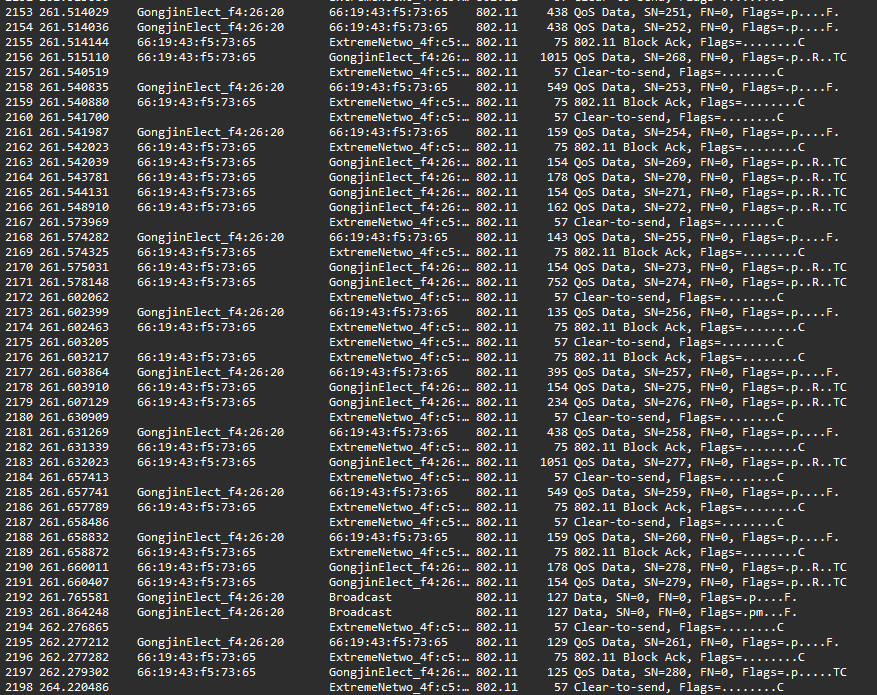
So I’m running remote sniffer on my wireless access point and what’s strange and needs clearer mind perhaps: I see occassional but recurring QoS data (WLAN traffic in general) from MK but at the APs wired ethernet port level, I could barely see any traffic.
The one shown upon the wireless interface was coming up quite vigorously. Could be fragmented Ethernet payload but it seemed to occur more often.
That could somewhat explain constant RF, I had all but Launcher forced shut. Maybe some multicast contained within a WLAN, I have to think.
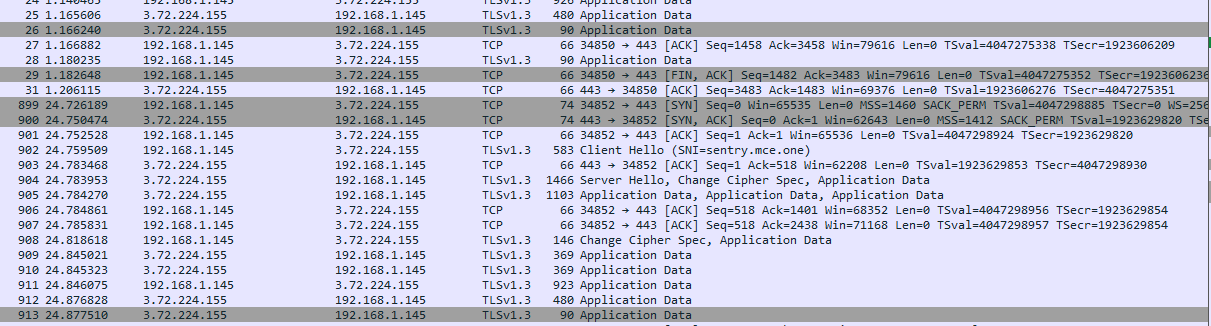
On the Ethernet site though, it was indeed mainly just sentry reach out when an app was opened.
Please don’t hack me given current randomized MK MAC address of 66:19:43:…
I don’t do wireless packet analysis often so I’m not sure yet what kind of traffic is that, seemingly just MK<->AP. But it looks like Wi-Fi/LTE keeps going on idle in a discretional way what could cause the measurement tool to see EM smog for a longer period of time (depending on its time resolution).