Review for version 0.1.18
User rating: ★★★★★
Is there a way to make the text a bit larger?
Review for version 0.1.18
Author’s rating: ★★★★★ · Author of this review
There is now: Glance 0.1.23 has a Text size setting (Normal, Large, Larger) that scales the whole panel. Release v0.1.23 · wanderwildwood/hitome · GitHub
Review for version 0.1.18
User rating: ★★★★★
the calendar integration in glance used to work perfectly for me but now, somehow no calendar events show on the lockscreen (while the weather is shown). I have it activated in glance and the app and it should fit the screen and is positioned on top in the settings, being the highest priority to be shown.
I was wondering if this could be related to the provider of my nextcloud calendar having some issues (disroot)? In the calendar apps I can see the events though…
Review for version 0.1.18
Author’s rating: ★★★★★ · Author of this review
Thank you for the report. Datebook 0.1.41 switched “Today’s events on the lock screen” off for anyone who had never touched it. You can switch it back on in Datebook, Settings, or update to the latest Datebook, which turns it back on: Release v0.1.52 · wanderwildwood/koyomi · GitHub
Review for version 0.1.18
User rating: ★★★★★
Very good app that shows notifications on the lock screen!
There seems to be a problem displaying tasks/notes on the lock screen in certain cases: when I have more than three tasks for “Today,” the Memo notifications disappear from the lock screen entirely. I’ve checked whether it’s related to the total number of lock-screen notifications, since I also use Glance alongside your calendar app. But when I add several events on the same day, “+x more” appears, as it should. I then tried removing one of the tasks for today when I had four, so that only three were displayed, and all the tasks appeared on the lock screen again.
What could be causing this?
Review for version 0.1.18
Author’s rating: ★★★★★ · Author of this review
Thank you, that was a real bug. When the lock screen ran short of room, only the calendar’s events were shortened to “+N more”; a task list that did not fit was left out whole. Glance 0.1.54 shortens any list the same way: Release v0.1.54 · wanderwildwood/hitome · GitHub
Review for version 0.1.18
User rating: ★★★★★
Thanks! Nice work!
Another issue: when I want to turn off my phone and an event from the Calendar app is on the lock screen via Glance, the event covers the power-off button (and the other buttons).
Edit: notifications from Memo does not appear in front of these buttons
Review for version 0.1.18
Author’s rating: ★★★★★ · Author of this review
Thanks again for dialing this in with me. I’ll have this remedied in the next release (today or tomorrow). Cheers 
Review for version 0.1.18
User rating: ★★★★★
Hi Wander!
I’m not sure whether the following request should be for Glance or Memo, but when I have a Memo for “today,” it appears on the lock screen as “Today,” followed by the tasks I’ve added. I don’t use tasks on the lock screen because they necessarily have to be completed in one day, but because they serve as reminders. So the “Today” heading feels unnecessary. Would it be possible to change it to something like “Notes” or “Memos,” or perhaps let us choose our own text?
I hope I’m not overwhelming you with all these suggestions!
Is there another way you’d prefer people to submit feature requests or suggest changes to your apps, or is this forum a good place for that?
You’re doing an amazing job!
Review for version 0.1.18
Author’s rating: ★★★★★ · Author of this review
Not overwhelming at all, these are good ideas. Memo puts anything with today’s date (or an overdue one) under “Today”, which is why your reminders land there. With Glance 0.1.56 and Memo 0.3.34, out now, a pinned note shows its open items on the lock screen too, under the note’s title, so reminders can live in a pinned note without a date and stay out of “Today”. Pin the note in Memo, and turn on “Today and pinned notes on the lock screen” in Memo’s Settings if it isn’t already.
Here in the thread is a great place for requests, or a GitHub issue on the app’s page if you prefer. Both reach me.
Review for version 0.1.18
Since updating to 2.0, I’ve noticed that WhatsApp notifications don’t show up on my lockscreen anymore. But I think this a feature of the Kalm launcher, so there might not be a fix to this 
Review for version 0.1.18
Hi, it’s me again 
After updating to version 0.1.59, notifications from Messaging also don’t show up on the lock screen anymore. I didn’t change any settings. What could it be?
I just reverted back to version 0.1.58 and the problem persists I do get Messaging’s notifications when I use Katapult launcher. It’s very mysterious!
Review for version 0.1.18
Thank you, and sorry for the trouble. Since 0.1.58, on MuditaOS 2.0 Glance left out other apps’ notifications, expecting the phone’s own lock screen to show them, but it only shows missed calls and texts. Glance 0.1.62 counts them again, and Messaging’s count is back too.
Review for version 0.1.18
User rating: ★★★★★
Hi @wander !
A general question about your apps: Why do they consist of two APK files? I download and update your apps through Obtainium, and it asks me to choose between two apps for each update. Sometimes I have to choose both, one at a time, for the update to go through.
Review for version 0.1.18
Good question. Each release carries the same APK twice: one with the version in its name, and a plain one so the download link in each app’s README always points to the newest. They are the same file, so either choice is fine.
To stop Obtainium asking: open the app in Obtainium, tap the settings cog, and under “Filter APKs by regular expression” enter
-v[0-9]
That keeps only the versioned file, and the same filter works for all of my apps.
Review for version 0.1.18
Thanks, it works again!
Review for version 0.1.18
User rating: ★★★★★
Thanks for your answer!
I thought of one more question: Why is the Memo app so much larger than your other apps? I think it’s around 30 MB, while the others are under 10 MB.
Review for version 0.1.18
It is the speech model. Memo writes your voice notes down as text on the phone itself, with nothing sent anywhere, and the model that does the listening comes inside the app. That model is about 57 MB of Memo’s 65 MB download. Without it Memo would be about the size of the others.
Review for version 0.1.18
User rating: ★★★★★
Thanks for your reply!
What’s the advantage of having it set up this way? My other apps don’t require it (except KeePass, which has two APKs: a free version and a paid version, I think).
I can’t find the setting you mentioned in Obtainium’s app settings. For example, when I tap one of your apps in Obtainium and then tap the gear icon, I’m taken to Mudita’s “App info” page. And I don’t see this filtering setting in Obtainium’s general settings. Hmm, could this have something to do with Mudita 2.0?
Review for version 0.1.18
User rating: ★★★★★
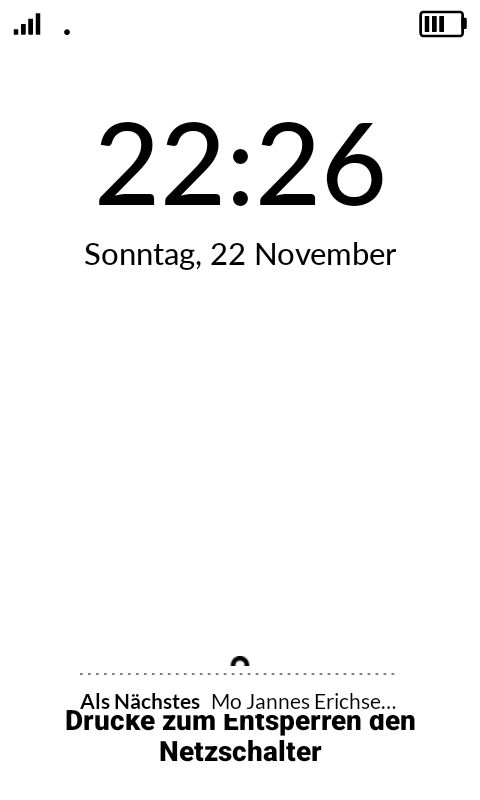
Since the new OS version from Mudita I am having some issues with Glance. Sometimes it is not showing at all, sometimes it works and sometimes it looks the way it looks on the screenshot. @wander any idea what the problem is?