Detour review by wander

Detour — Community App Review
Version: 0.1.1

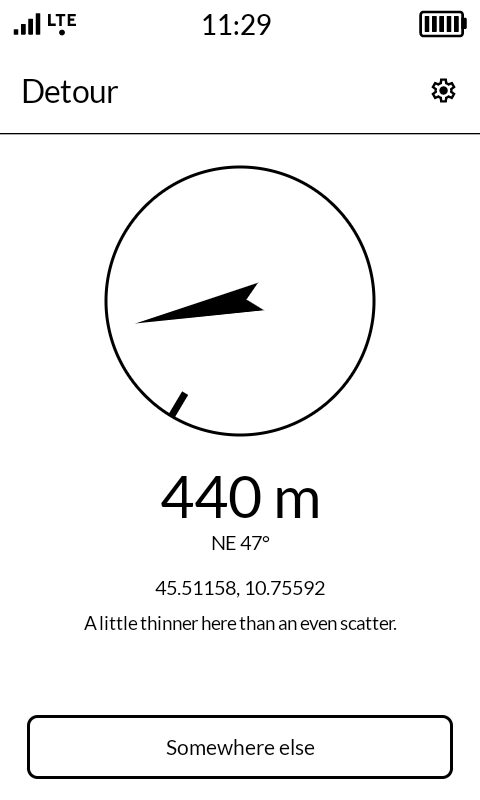
Detour gives you somewhere to walk to that you would never have chosen. Press Go and it scatters a thousand random points over the ground around you — a quarter mile out, or five miles, as you set it — works out where they fell thickest, and sends you there. Or to the thinnest patch, if you would rather have the empty part. What you get is an arrow, a distance and the coordinate. The arrow turns as you turn. There is no map in the app: the Kompakt already has offline maps that draw better than a monochrome panel can, so Open in maps hands the coordinate to whatever you have installed and lets it do that job. It also says what the scatter actually did — “no thicker here than chance usually gives”, most of the time. That line is there because it is usually true. One permission, for your position. No network permission at all, so nothing can leave the phone; the random numbers come from the phone’s own generator rather than from a server. It keeps three settings and no history of where it has sent you. The idea is much older than the app. In 1921 the Paris Dadaists ran guided tours of places chosen for being nothing in particular; three years later four of them took a train to a town picked at random off a map and walked into the countryside. This is that with a phone.
Review updated by @wander

  • Version: 0.1.1 → 0.1.3
  • Checksum: 149fe1aa5318fb632e21882276a011e103eab42645e243a25f4a2ef5eec02083 → 19e9381e0ecf6fa6b60159cd3651943527872d93c0ecc32eebb5351e7364a457

View current review

Review updated by @wander

  • Version: 0.1.3 → 0.1.10
  • Checksum: 19e9381e0ecf6fa6b60159cd3651943527872d93c0ecc32eebb5351e7364a457 → 2bdb816cd2a9bce110130e274412e5055da3af029961ebd9b4321d6b1427b5ea

View current review

Review for version 0.1.10
User rating: ★★★★★

Hi!

Thanks for this amazing app! The idea behind it is great, and yesterday I had the chance to give it a try.

However, I ran into an issue with the navigation. As I walked towards the target point, the distance shown on the screen did not update—it stayed stuck at “500m” the whole time, and the compass kept pointing in the same direction. Because of this (and since I don’t have the “Open in maps” button enabled), I couldn’t tell if or when I actually reached the destination.

Could you please take a look at what might be causing this? My GPS/location permissions are enabled.

Thanks a lot for all your work!

Review for version 0.1.10
Author’s rating: ★★★★★ · Author of this review

Thank you for the report, @Aughi, and for the screenshot. The distance and the arrow were worked out once, from where you stood when you pressed Go, and were never recalculated as you moved, so they stayed stuck however far you walked. I’ve fixed that in 0.1.13: both now follow every position update, a “You are here” line appears when you’re within about 80 feet (25 m) of the point, and if the position is lost or old it says so.